
Do Teslas Have Heated Steering Wheel? A Complete Breakdown
This post contains affiliate links. As an Amazon Associate, we earn from qualifying purchases.
Yes, many Tesla models have a heated steering wheel, but it is not a standard feature on every car. Availability depends on your vehicle’s specific trim, configuration, and date of manufacture. If equipped, you activate it through the climate control menu on the touchscreen, and it uses radiant heat to warm the wheel rim to a comfortable temperature.
That “if equipped” clause is the whole game. Tesla’s approach to features is famously fluid, with options appearing and disappearing based on supply chains and trim shuffles. A 2021 Model 3 Standard Range Plus might not have it, while a 2023 Model 3 Long Range almost certainly will.
What follows: a breakdown of which trims to check, the two ways to activate the heat (manual and Auto), the physical controls built into the wheel itself, and what to try when the promised warmth doesn’t arrive.
Key Takeaways
- Heated steering wheels are not standard on all Teslas; check your trim and build date.
- Activation is solely through the touchscreen climate menu, there is no physical button on the wheel.
- The “Auto” setting heats the wheel based on cabin temperature, independent of your climate control fan settings.
- If your heater doesn’t work, the issue is often a software glitch solvable with a reboot before considering a service visit.
- Using thick or non-breathable steering wheel covers can block the radiant heat and make the feature feel ineffective.
Which Tesla Models and Trims Have a Heated Steering Wheel?
You cannot assume your Tesla has a heated wheel just because it’s a Model 3 or Model Y. The official owner’s manual states it clearly: “Depending on trim, configuration, and date of manufacture, your vehicle may not be equipped with a heated steering wheel.”
This isn’t a vague disclaimer. It reflects real variance on the production line. As a general rule, the feature is more consistently included on higher trim levels and newer model years.
| Model & Trim | Typical Heated Steering Wheel Availability | Where to Double-Check |
|---|---|---|
| Tesla Model 3 Long Range / Performance | Standard on 2022 and newer models. Common on 2020-2021, but not guaranteed. | Look for the steering wheel icon in your climate control pop-up. |
| Tesla Model 3 Standard Range / Plus | Often excluded on 2019-2021 builds. More common on 2022+ refresh models. | Your vehicle’s software “About” screen lists included premium features. |
| Tesla Model Y (All Trims) | Standard on virtually all Model Y builds, especially in North America. | The icon should be present next to the seat heaters. |
| Tesla Model S / Model X | Standard equipment on all recent builds. |
The heated steering wheel uses radiant heat to keep the steering wheel at a comfortable temperature. This is a constant, low-level warmth across the entire rim, not a blast of hot air.
If you’re buying used, don’t take the seller’s word for it. During a test drive, tap the fan icon on the bottom of the touchscreen and look for the steering wheel icon. If it’s not there, the hardware isn’t present. No amount of software updates will add it later.
How to Turn On the Tesla Heated Steering Wheel
There is no dedicated button on the steering wheel itself. All control lives in the touchscreen. The process is identical for Model 3 and Model Y.
- Tap the climate control icon. This is the fan symbol at the very bottom of your center touchscreen. A detailed climate pop-up will appear.
- Locate the steering wheel icon. It’s in the cluster of buttons near the seat heater icons. The icon shows a stylized steering wheel.
- Tap to activate. A single tap turns the heater on to its highest setting. The icon will fill with red twisting lines to indicate it’s active.
- Adjust the level (if desired). Tap the icon again to cycle through three heat levels. Three red lines is maximum, one red line is low. Tap once more to turn it off.
Where this goes sideways: Trying to activate it from the mobile app. Many owners report that scheduled preconditioning or remote start from the app will turn on seat heaters but sometimes skip the steering wheel. The fix is to get in the car and tap the icon manually, the app’s logic is less reliable for this specific feature.
The system is power-efficient. It draws from the main battery, but the draw is minimal compared to cabin heating. You can use it freely while parked without worrying about significant range loss.
Understanding the “Auto” Setting
When your main climate control system is set to “Auto,” you might see the steering wheel icon labeled “Auto” as well. This is a separate, smart function.
If set to Auto, the steering wheel is heated as needed based on cabin temperature, independent of the climate control system settings.
This means the wheel will turn on its heater when the car’s internal sensors decide the cabin is cold enough, even if you have the fan speed set to zero. It’s a set-and-forget convenience for winter. If you want direct control, just tap the icon to switch from “Auto” to a manual heat level.
The Other Essential Steering Wheel Controls
While the heating is screen-based, almost every other steering wheel function uses the physical scroll buttons or the center pad. Knowing these makes the wheel feel integrated.
- Left Scroll Button: This is a multi-tool. You roll it up/down and press it left/right. Its default functions are media volume (roll) and track skip (press left/right). But it also controls the steering wheel adjustment and wiper speed.
- Right Scroll Button: Primarily used for cruise control speed and follow distance when Autopilot or Traffic-Aware Cruise Control is active.
- Center Pad: This is your horn. Press and hold the entire center section of the wheel. Don’t tap, press firmly and hold.
How to adjust the steering wheel position: Touch “Controls” on the bottom menu bar, then tap the “Steering” icon. Once the adjustment screen is active, use the left scroll button to move the wheel. Roll it up/down for tilt. Press it left/right for telescope (in/out). This is a safety feature, you can’t accidentally move the wheel while driving.
What to Do When Your Heated Steering Wheel Isn’t Working

A non-functional heater is a common gripe on owner forums. The problem usually falls into one of three categories: software, hardware, or a simple blockage.
| Symptom | Likely Cause | Immediate Fix to Try |
|---|---|---|
| Icon is missing from climate menu. | Vehicle not equipped with hardware. | No fix. Confirm trim/build date. |
| Icon is present but unresponsive. | Touchscreen or vehicle software glitch. | Perform a scroll wheel reboot. |
| Heater turns on but feels weak or patchy. | Thick steering wheel cover blocking radiant heat. | Remove the cover and test. |
| Heater works intermittently. | Possible fault in heating element or wiring. | Schedule a diagnostic with Tesla Service. |
Common mistake: Assuming a hardware fault immediately. The Tesla infotainment system is a computer. When the heated steering wheel icon is present but does nothing, reboot the system first. Press and hold both scroll buttons on the steering wheel until the touchscreen goes black and the Tesla logo appears. This clears temporary software hangs and solves the issue more often than not.
If the reboot doesn’t work, and you’ve confirmed you aren’t using a cover that insulates too well, a service visit is the next step. There are heated steering wheel covers that can serve as a temporary winter solution, but they are a workaround, not a repair.
Compatibility: Steering Wheel Covers and Heating
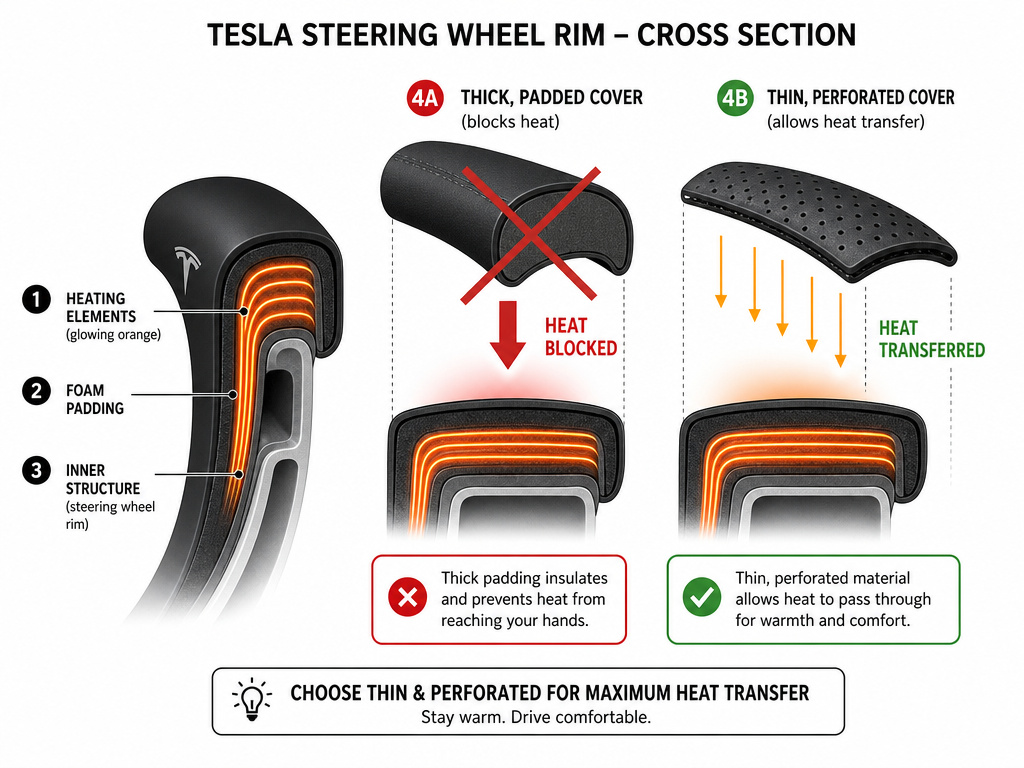
Can you use a steering wheel cover and still have heat? Yes, but with a major caveat.
The factory heater works via radiant heat transferred directly from the wheel’s rim into your hands. Any material between your skin and the wheel acts as an insulator. A thick, padded, or non-breathable cover will absorb most of the warmth before it reaches you, making the feature feel useless.
If you want a cover for grip or aesthetics, you have two paths: 1. Choose a very thin, perforated, or non-interfering steering wheel cover designed specifically to work with heating elements. 2. Use a wireless heated cover that has its own battery-powered heating system, bypassing the factory heater entirely.
Avoid generic, thick covers. They ruin the heated wheel’s effectiveness and can be a safety issue if they slip. If your wheel is worn, a proper steering wheel replacement or rewrap is a better long-term investment than a masking cover.
Tesla Steering Wheel vs. Traditional Cars
The Tesla approach is a study in minimalist integration. In most traditional luxury cars, a heated steering wheel is a physical button on the dash or wheel spoke. Tesla eliminates the button, reduces part cost, and moves the control into software. This allows for the “Auto” logic and over-the-air updates but adds a layer of abstraction, you must use the screen.
The wheel itself is also a data hub. The scroll buttons and center pad are the main tactile interfaces for critical functions like wipers, horn, and driver-assist settings. This centralization is why adding steering wheel controls or attempting to retrofit a heated steering wheel on an older Tesla is a complex, costly procedure best left to Tesla Service. It’s not just a wiring job; it involves software configuration and module validation.
Frequently Asked Questions
Can I add a heated steering wheel to my Tesla if it didn’t come with one?
Officially, no. Tesla does not offer this as a retrofit through their service centers. The heating element is integrated into the wheel’s construction during manufacturing. While third-party shops might attempt an aftermarket heated steering wheel installation, it risks voiding warranties and causing electrical issues. Using a high-quality aftermarket heated cover is the safer, simpler alternative.
Why does my heated steering wheel turn off by itself?
If you didn’t turn it off, it’s likely due to the “Auto” setting. In Auto mode, the car will deactivate the heater once the cabin reaches a predetermined temperature. If you want it on continuously, tap the icon to switch from “Auto” to a manual heat level (3, 2, or 1).
Is it bad to use a steering wheel cover on a Tesla?
It can be. Beyond blocking heat, poorly fitting steering wheel covers can interfere with your grip or, in a worst-case scenario, slip during steering input. If your wheel is leather and you’re using a cover to protect it, you’re better off with a dedicated leather steering wheel cleaner for maintenance. If you must use one, select a cover designed for heated wheels.
Does the heated steering wheel use a lot of battery?
No. The energy draw is negligible compared to the cabin HVAC system or driving the car. Using it for an hour might use roughly the same amount of energy as driving one extra mile. It’s a very efficient comfort feature.
My steering wheel gets too hot. Is that normal?
On the highest setting (3 red lines), the wheel can get quite warm. If it feels uncomfortably hot to the point of being concerning, reduce it to level 1 or 2. The system is designed for comfort, not to cause discomfort. If it feels excessively hot even on low, it could indicate a faulty thermostat and should be checked by service.
Before You Go
The heated steering wheel in a Tesla is a brilliant winter feature, when you have it. Check your touchscreen for the icon to confirm. Use the “Auto” setting for hassle-free warmth, and remember the scroll wheel reboot if it acts up. If your car lacks the hardware, a dedicated wireless heated cover is your best path to warm hands.
And if your wheel is just looking worse for wear, consider a proper steering wheel replacement or a set of premium leather steering wheel covers over a bulky generic cover. The goal is to keep the interface between you and the car sharp, comfortable, and functional in every season.
